File Share app & Pricing Plans Integration
Team Context
This project was completed as part of my work at Wix Labs, an innovation group within Wix focused on developing complementary products and experiences that extend the capabilities of the Wix platform.
The team creates apps, plugins, and tools that help users solve needs that are not fully addressed by the core editor experience. These solutions are designed to support a wide variety of use cases while fitting naturally into existing Wix workflows.
As a Product Designer on the team, I worked on products that required balancing user needs, business opportunities, and the flexibility needed to support diverse audiences.
Project Overview
File Share is a Wix app that allows site owners to upload files, organize them into folders, and control who can access their content.
Pricing Plans is a Wix service that enables businesses to sell memberships and paid access to digital experiences.
As both products evolved, we identified an opportunity to bring them together. Users managing content libraries increasingly wanted ways to monetize that content, but the connection between the two products was difficult to discover and use.
The goal of this project was to make monetization an accessible part of the File Share experience while preserving the simplicity of existing workflows.
The Product
Because Wix serves a broad range of users, File Share supports many different scenarios. One example is an educational organization that manages teaching materials across multiple schools. Teachers upload assignments and resources, while students and parents receive access based on their role:

Another example is an ADHD coach who shares guides, worksheets, and learning resources with an online community, offering some content freely while reserving premium materials for paying members.

These use cases required File Share to remain highly flexible while providing users with greater control over how content is distributed and accessed.
The Problem
User conversations revealed that many creators wanted more than secure file sharing. They wanted ways to generate revenue from the content they had already invested time in creating.
As a result, creators who were already selling memberships through Pricing Plans often did not realize they could connect those plans directly to File Share folders. Valuable monetization opportunities existed within the product, but users struggled to discover them.

Main Goal
To make monetization feel like a natural extension of the File Share experience.
We wanted users to understand the value of connecting folders to Pricing Plans, discover this capability at the right moments in their journey, and complete the process without disrupting their existing workflow.
At the same time, the experience needed to accommodate users at different stages of adoption. Some users already had Pricing Plans configured, while others were encountering the service for the first time.
The solution therefore needed to support discovery, education, and task completion within a single experience.
UX Challenges
Integrating File Share and Pricing Plans introduced several UX challenges that went beyond visual design:
Designing a cross-product experience: Pricing Plans was not built inside File Share. It was an independent service page (See image) with its own setup process and logic. One of the biggest challenges was helping users understand the relationship between the two products without making them feel like they were leaving their current workflow.

Supporting different levels of product maturity: Some users already had Pricing Plans configured, while others had never encountered the product before. The experience needed to adapt to both scenarios while maintaining a consistent flow.
Communicating permission complexity: File Share already included permission models such as public, private, and hidden folders. Introducing Pricing Plans created additional access conditions that could overlap with existing permissions. The challenge was helping users understand how these rules interacted, preventing confusion around conflicting states, and ensuring they understood the outcome of their choices.
The table below elaborate the File Share permissions logic:

Keeping users in context: Whenever possible, we wanted users to complete actions without restarting their journey. When users needed to create a new Pricing Plan, the flow guided them through setup and then returned them back to File Share so they could continue exactly where they had left off.
Design Approach
Because Pricing Plans existed as a separate cross-product service, our focus was on reducing the friction involved in connecting two independent systems.
We explored several concepts that would surface monetization opportunities at meaningful moments in the File Share journey.
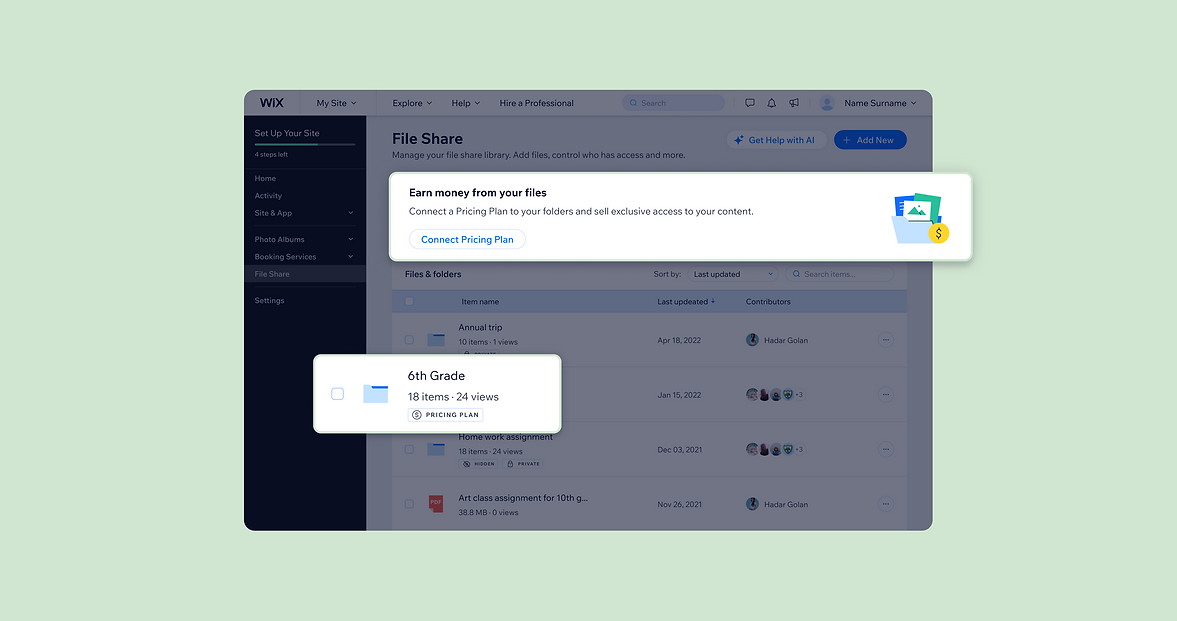
One direction focused on high visibility and education. We introduced a contextual banner within the File Share dashboard that explained the value of monetizing content and encouraged users to take action.
The banner adapted to the user's setup. Users who already had Pricing Plans installed were guided directly into the connection flow (Image A). Users who had not yet adopted Pricing Plans were introduced to the service and encouraged to install it first (Image B).
We also identified an opportunity to support users who already had a clear intention. Rather than requiring them to navigate through settings, we introduced an additional entry point directly within the folder table (Image C).
By combining educational and action-oriented entry points, we supported both exploratory users and users who were ready to complete a specific task.
.png)
The Design Solution
The final interface was designed to make monetization feel like a natural extension of the File Share workflow rather than a separate configuration task. At the top of the File Share dashboard, we introduced a banner that highlights the ability to earn money from uploaded files by connecting folders to Wix Pricing Plans.
The banner uses a clear messaging and a prominent call to action that opens the connection flow modal directly within File Share app. The File Share table remains the core workspace, allowing users to manage their content as usual, while additional monetization actions are seamlessly integrated into the interface.
When hovering over a row in the table, a dollar icon appears. Clicking it opens a modal that allows users to connect a specific folder to a Pricing Plan:

The connection flow itself is presented in a modal, allowing users to select the relevant plan and apply the permission without leaving the File Share environment.
This design keeps the interaction simple and consistent with the existing product patterns, enabling users to monetize their content without disrupting their workflow.
The video below shows the happy flow of the final experience:
Post-launch observations
Without a dedicated analyst on the team at the time, I relied on FullStory session recordings and direct conversations with users to understand how people interacted with the experience after launch.
The sessions confirmed that the original problem was real. Many users were unaware they could monetize existing content through File Share, and the new entry points helped surface this capability.
I saw users successfully connect folders to Pricing Plans through the flow. I also noticed many others exploring the connection option for the first time, even when they didn't complete the setup.
This raised an interesting question. Was the drop-off driven by users who were still evaluating the opportunity, or did it reveal friction within the connection flow itself? With stronger analytics in place, this is an area I would have explored further.